
Background to GDPR
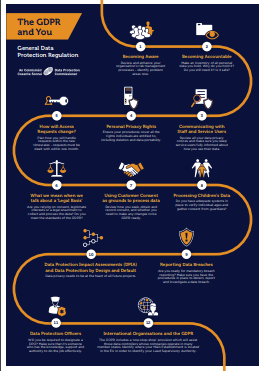
MindaClient sees the introduction of GDPR as an opportunity to enhance the protection of the personal data it processes and also to give all organisations who use MindaClient the tools to help them comply with the requirements of GDPR. The Data Protection Commissioner put together a very helpful website www.gdprandyou.ie. They produced a very easy to follow infographic that explains the basics of the GDPR.
What steps have MindaClient taken.
A. New Server
We migrated MindaClient to a new server and hosting partner. This new server is more scalable to allow for future growth. It provides additional security facilities and both the data and the backups are all hosted in Ireland and is all within the EU.
B. New Policies, Procedures and Processes
The Data Commissioner of Ireland prepared a very comprehensive document which is “PREPARING YOUR ORGANISATION FOR THE GENERAL
DATA PROTECTION REGULATION”

This document included a checklist of 56 headings and under each heading it provided guidance on complying with them. These covered areas like
- personal data
- data subject rights
- accuracy and retention
- transparency requirements
- other data controller obligations
- data security
- data breaches
- international data transfers
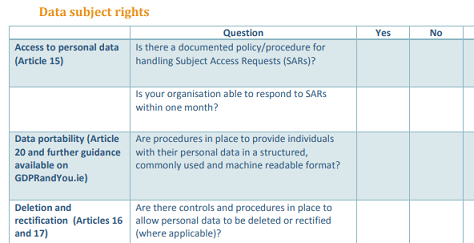
Sample from GDPR Checklist
We have gone through every point on the Data Commissioners checklist and identified all the ones that relate to our company. We then identified where we needed to write a new policy or procedure or updated an existing policy where appropriate. We are also identifying all tasks that we needed to carry out. All of this work is nearing completion and will form part of our full GDPR document over the coming weeks. We will be updating our policies on our website at that point.
C. Updates to MindaClient
We have 10 areas where MindaClient can help you to become GDPR compliant. These features will be made live on MindaClient over the coming weeks.Caution: MindaClient does not make your company compliant with GDPR. It provides you with the tools to help you become compliant in accordance with your own GDPR policy.
1. Consent Management
Article 7 deals with conditions for consent
Article 13 outlines the information needed where personal data is collected from the data subject
GDPR requires businesses to have a purpose for collection of any personal information. This purpose should always be supported by a legal basis which can be a contractual obligation, a legitimate interest for storing and using data or that explicit consent has been given. Anytime that consent is used as the legal basis for collecting and storage of personal data, GDPR requires that a company can prove that consent has been given by the person.
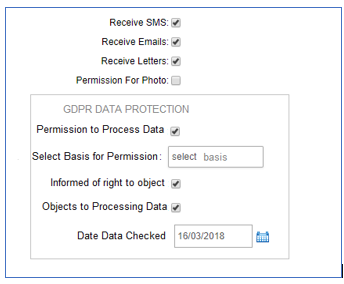
MindaClient Client Profile screen
The new GDPR permissions are on the bottom right and there is a date field to record when you last checked the data. This helps you comply with the GDPR requirement to keep the data up to date.For each person added to MindaClient you will be able to digitally record consent, record the legal basis for why you are storing the data from a predefined dropdown list. MindaClient will also record who has updated the information and when it was updated. Based on the new “Date data Checked” field in MindaClient you will have the facility to contact your clients and contacts. This will allow you to filter and communicate with clients who haven’t had their “Date Data Checked” field in the last two years for example.
2. Ongoing Option to opt out
Article 18 deals with the right to restriction of processing
GDPR requires that when a contact has given his consent to receive marketing communications such as email or SMS from your company, they should always have the right to opt-out from receiving future marketing communications.
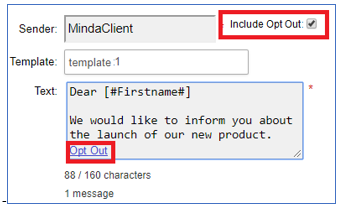
Opt out option for texts
MindaClient now has a simple tickbox that is available for individual and bulk communication to clients. This is built into the Email communication and the Text communication. You just tick the “Include Opt Out” tickbox and the recipient will have the option to opt out.
3. Data Retention
Article 17 covers the right to erasure (‘right to be forgotten’)
GDPR places a responsibility on data controllers to be clear about the length of time for which data will be kept and the reason why the information is being retained. Your company should have a defined policy on retention periods for all items of personal data kept.Once you have decided what your policy is you can filter your clients in MindaClient and proceed to delete them based on your own criteria.
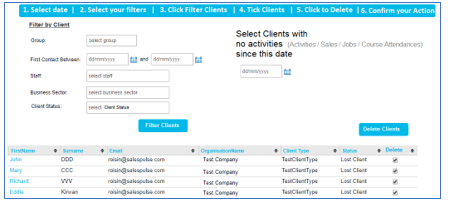
Bulk delete Screen
This bulk delete facility is only available at Administration level. There are multiple checks built in to ensure that data is never deleted in error.A change in MindaClient is that this data is instantly and completed deleted once you have doubly confirmed. Previously deleted data would have gone into the archive section but in order to comply with the GDPR regulations the data is fully deleted. To provide a level of transparency the audit does record who has carried out a bulk deletion, when it was carried out and how many clients were deleted. Deletion of data is a final step and should be carried out in accordance with your own retention policy under GDPR. There are other Data Cleansing housekeeping activities that should be carried out to ensure that your data is accurate and up to date as required by GDPR.
4. Data Cleansing
Article 5 of the GDPR regulations requires that personal data shall be accurate and, where necessary, kept up to date
MindaClient provides facilities to help you keep your data accurate and up to date.
Bulk Updating
In MindaClient you can filter your clients and then carry out bulk updating on sections of your client base. Here are some examples of how this could be relevant to your company under GDPR.
- For existing clients, you could update your clients and contacts to remove permission to communicate by Text, Email or printing labels.
- You could filter a section of your clients and archive them at the end of the year.
- You could assign all clients from one sales person to another with staff turnover.
Deduplicating data
MindaClient warns you if you are adding a client that is in already. However If you do come across any duplicated data you can combine the records using our Merge Client facility
Deletion of clients
You can delete an individual client or you can delete clients in bulk as outlined above. You will always be prompted to confirm any deletion of data in MindaClient. Deletion of clients should always be in accordance with your GDPR policy.
5. Anonymising your Clients.
Article 16 outlines the right to rectification
Article 17 outlines the right to erasure (‘right to be forgotten’)
Article 19 details the notification obligation regarding rectification or erasure of personal data or restriction of processing
Article 17 of the GDPR regulations states that a person has the right of erasure also known as “The right to be forgotten”. It states that they have the right to obtain from the controller the erasure of personal data concerning him or her without undue delay and the controller shall have the obligation to erase personal data without undue delay. MindaClient has built a facility that lets you anonymise the personal information relating to both clients and contacts. You can anonymise an individual contact where that contacts personal data is anonymised. You can anonymise a client where the personal data or the main contact and all linked individual contacts will be anonymised. You can anonymise Clients and Contacts in bulk. There are checks and confirmations in place to ensure that data is never anonymised without user express confirmation. Anonymising of data is permanent and cannot be undone. Anonymising of a client or contact will involve removing the following from their record.
- Firstname
- Surname
- Address
- Phone number
- Mobile
- Email Address
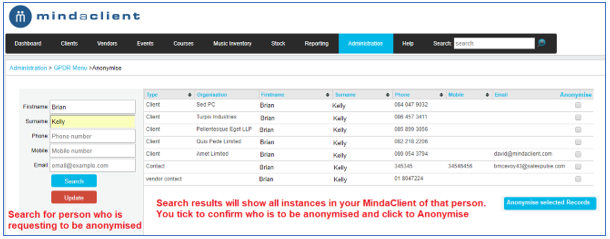
Anonymise Contact Screen
Activities such as sales, meetings, jobs that have previously been recorded with this contact will still remain in MindaClient but the contact that they have been linked to will simply display “GDPR Removed” The name of the company or organisation which is not personal information will also remain.
6. Internal Restrictions
Article 25 refers to Data protection by design and by default
The processing of client data is an area that is given much coverage under GDPR. Permission to process, purpose of processing and processing for set length of time. Internally, within your company it is very important that your users only have access to the data that they need to process. Their access rights may also have to change depending on what part of your business they are working in. MindaClient provides a comprehensive facility where you can set access rights for users, ranging from full administration rights to all data, right down to read only or mobile only access rights
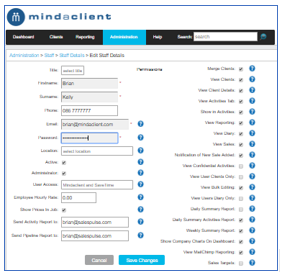
User Access permission screen
7. Protecting your data from staff
Article 24 states that the controller shall implement appropriate technical and organisational measures to ensure that processing is performed in accordance with this Regulations
Your sales people and users must have access to client information in order to process the data by recording meetings, sales etc. With the additional requirements of GDPR and the protection of personal information, some companies are becoming more aware of the possibility of employees who are leaving copying client information. There are three points in MindaClient that address these concerns.
- There is an audit trail running in MindaClient that tracks changes made by users. It displays the old value, the new value, who made the change and when it was made.
- In the main Client Reporting screen if a user downloads any client information the audit trail records who downloaded the data, when it was downloaded and what the criteria for the report was.
- If a user is leaving your company, the key thing to do is just tick to make them inactive and they will no longer have access to your client data
8. Processing of Requests
Article 30 deals with Record keeping for the processing of activities
Every EU citizen will have the right to ask how an organisation is using their personal data, where it’s used and why. They also have the right to request a digital copy of the data that is being held about the individual. GDPR gives the “Data Subject” many rights such as Right of access, Rectification, Erasure, Rectification, Erasure & Restriction. The record keeping and processing of these rights is one of the controllers responsibilities. MindaClient has developed procedures that will allow you to process all requests from Data subjects. When you receive a request you can record it in MindaClient for the relevant client. You can record the following :
- The type of request
- The person who took the request
- The person who made the request
- The date of the request
- The time of the request
- How long you spent processing the request
- Any other comments
You can set reminders and follow ups to ensure all requests are processed. You can report on all requests in the reporting section.
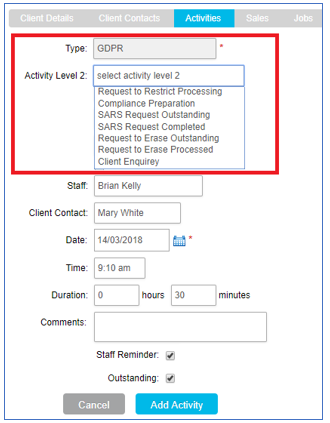
Processing requests in MindaClient
9. Audit Trail
Section 2 of the regulations deals with the Security of personal data
Under GDPR you need to be able to answer the following questions
“Who accessed or changed data within our systems?”
“When was the data accessed or when was it changed?”
“When did a specific user last access to the system ?”
There is an audit trail running in MindaClient and this tracks all changes by users. It records
- The person who added the record
- The value before the change was made
- The person who made the change
- The date and time of the change
- The new value of the data
- It records when a user accessed MindaClient
It records changes to dropdown lists
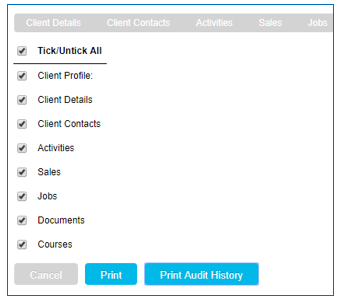
Print Audit history for Client
If you wish to view the full audit trail for a client you can select which area you wish to print the audit for or you can select to print all changes.
10. Security
Article 32 of the GDPR regulations deals with the Security of processing
Article 32 states that the controller shall implement appropriate technical and organisational measures to ensure a level of security appropriate to the risk.The following is a summary of the security steps that MindaClient has undertaken.
Encryption
All data transferred to and from our websites is encrypted via HTTPS using strong SHA-256 bit encryption. Similarly, all backups between servers are made using SHA-256 bit encryption.
Constant Back up
A full backup of the MindaClient server is made every hour using a secure SSH encrypted connection between servers. This is done using an automated and dedicated backup service located within the Irish Republic.
Firewall
Our MindaClient server has a hardware firewall at datacentre level, and in addition there is a software firewall on each machine. Access over all ports is fully restricted based on the need to access, and when access is allowed, this is further restricted based on IP address.
Failover
Our MindaClient server is mirrored in real time to a failover server on the AWS cloud (Dublin). In the unlikely event of a disruption to service on our primary server, we have an IP switching service in place that will allow us to simply failover to the secondary machine.
Hashed passwords.
All passwords are hashed. In the event of a breach, none of our user passwords can be decrypted.
Strong passwords
We have implemented a ‘strong password’ policy. When creating a password, this strong password criteria must be met by users.
Regular Updating of Passwords
We have an automated facility that allows our clients to turn on the forced updating of their users’ passwords. When a set time period has elapsed, the user will be required to change their password to a new ‘strong’ password.
Password Reset
If a user needs to reset their password, they can make this request on the login page of our website. An email is sent to the registered email account of that user, allowing the user to update their password securely.